

Three golden rules for collecting feedback that are actually useful

Key highlights
Getting people to complete a survey is only half the challenge. The other half is making sure the feedback you collect is accurate, detailed, and actionable. Three principles consistently separate high-performing feedback programmes from the rest.
What you'll learn in this post:
- Why timing is the single biggest driver of both response rates and response quality
- How subtle wording choices in your questions introduce bias without you realising
- Side-by-side examples of biased vs. neutral question phrasing
- Why asking for data you already hold damages the respondent experience
- How to use hidden fields and data piping to reduce survey length without losing context
Rule 1: Ask when emotions are flowing
The best time to ask for feedback is when the experience is still fresh. Whether the respondent is feeling frustrated, relieved, delighted, or disappointed, that emotional proximity is what produces detailed, honest, useful responses.
This isn't just intuition. It's a consistent pattern in feedback programme data. Surveys triggered at or near the point of experience produce both higher response rates and better quality data than those sent later.
The reason is straightforward. When someone has just finished an interaction, they remember the details. They can tell you exactly what went well, what went wrong, and what they felt. Ask them a week later, and that specificity fades. Responses become vague ("It was fine"), motivation drops ("I can't be bothered"), or they don't respond at all.
What "right time" looks like in practice
The common thread is capturing feedback at the point of experience, not in a batch process that runs on a schedule disconnected from what the customer actually did.
Making this work at scale
The practical requirement is automation. You can't manually send a survey every time a customer finishes an interaction, especially at scale. Instead, you define triggers: specific events or actions that automatically prompt a feedback request.
For digital interactions, this typically means connecting your survey platform to your CRM or business tools. When a support ticket moves to "Resolved," the survey fires automatically. When an order is marked as delivered, the feedback request goes out. No manual step required.
For physical interactions, QR codes on receipts, at exit points, or on printed materials let respondents give feedback while the experience is still fresh, without needing you to know their email address or phone number.
The key is matching the trigger to the moment. If your tech stack supports it, integrations between your survey platform and business systems can handle this automatically.
For a practical walkthrough of how to set up automated triggers across different touchpoints, watch our feedback collection webinar.
Rule 2: Eliminate bias from your questions
Biased questions produce inaccurate data. And the problem is that bias in survey questions is often subtle enough that the person writing the survey doesn't notice it.
A common example is the question: "How could we improve?"
On the surface, this seems reasonable. You're asking for improvement suggestions. But read it again. The question assumes something needs improving. It frames the interaction as having been negative. A respondent who had a perfectly good experience has no useful way to answer this question, so either they skip it, or they manufacture a criticism that doesn't reflect their actual experience.
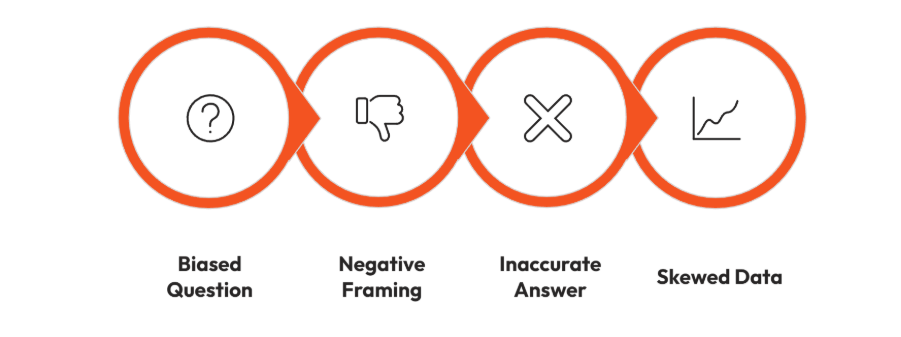
The result is a dataset that skews negative. If you then run sentiment analysis on those open-text responses, you'll see disproportionately negative sentiment, not because the experience was bad, but because the question design invited negative responses.
Biased vs. neutral: side-by-side examples
The principle is simple: your question should not suggest a direction. The respondent should be equally able to share a positive, negative, or mixed experience without feeling led.
Why this matters for sentiment analysis
If you're using tools like sentiment analysis to process open-text feedback at scale (which is increasingly common as feedback volumes grow), biased question phrasing directly corrupts your results. Sentiment models work by analysing the language respondents use. If your question has already pushed them towards negative language, the model will surface negative sentiment, but it's an artefact of your question design, not a genuine reflection of customer experience.
Neutral prompts produce cleaner data, which means your analysis outputs are more reliable and your recommendations to stakeholders are built on solid ground.
How to check your own questions
Before launching any survey, read each question and ask:
- Does this question assume the experience was positive or negative?
- Could a respondent with the opposite experience answer it naturally?
- Am I suggesting the "right" answer through my phrasing?
If you answer "yes" to any of the first two or "yes" to the third, rephrase.
Rule 3: Never ask for data you already have
This rule is about respect. If you already know which product someone purchased, which store they visited, which department they work in, or which support agent handled their case, do not make them tell you again.
Asking for data you already hold creates two problems:
- It wastes the respondent's time. Every unnecessary question adds friction and increases the chance of abandonment.
- It signals that you don't value their time or know who they are. For a customer experience programme, this is particularly damaging. You're asking someone to help you improve their experience while simultaneously delivering a poor experience in the feedback process itself.
How to fix this with hidden fields and data piping
The solution is to pull known data into the survey behind the scenes. Most survey platforms support hidden fields (questions the respondent never sees) with default answers populated from your CRM, business tools, or the data passed through when the survey is triggered.
For example, if a survey is triggered by a CRM integration after a hotel stay, the hotel location, room type, and booking reference can all be piped in automatically. The respondent never sees those questions. But when you analyse the results, you have all the contextual data you need to segment, filter, and act on the feedback.
Common data points to pipe in (not ask for)
- Product or service purchased
- Location, branch, or store visited
- Support agent or team involved
- Customer segment or account type
- Employee department or role
- Date of interaction
- Channel used (web, phone, in-store)
If you hold it in your CRM or business system, pipe it in. Save the visible questions for things only the respondent can tell you: their experience, their feelings, and their suggestions. If you're not sure whether your survey platform supports this, look for hidden field and piping capabilities, or check whether it integrates with your existing systems.
Bringing the three rules together
These rules aren't independent. They work as a system.
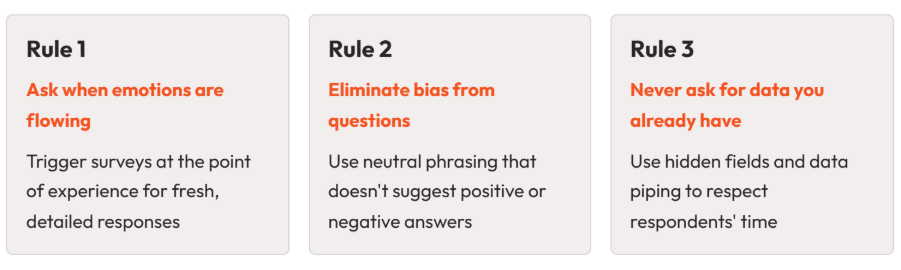
Here's what that looks like in practice:
A customer finishes a support call. Because you've set up an automated trigger (Rule 1), your survey platform sends them a short survey within minutes. The survey asks a CES question ("How easy was it to get your issue resolved?"), followed by a neutral open-text prompt ("Please give us your feedback on your experience.") with no leading language (Rule 2). Behind the scenes, the support agent's name, the ticket number, and the issue category are piped in as hidden fields (Rule 3). The customer answers two questions in under 30 seconds. You get a clean data point, an honest open-text response, and full contextual data to act on.
That's the difference between a feedback programme that generates noise and one that generates signal.
Checklist: apply the three rules to your next survey
Before you launch your next survey, run through this:
- Timing: Is this survey triggered at or near the point of experience? If not, can you move the trigger closer?
- Bias check: Read every question aloud. Does any question assume a positive or negative experience? Does any question suggest the "right" answer?
- Data you hold: List the contextual data points in your survey. For each one, ask: do we already have this in our CRM or business system? If yes, pipe it in as a hidden field and remove the visible version.
Want to see these principles in action? Our feedback collection webinar walks through how to design short, well-timed surveys with automated triggers and hidden fields. Watch the webinar.


Neil has a deep understanding of software and how to bring its value to market. With experience across Human Capital Management, Learning & Development, AI-powered platforms and omnichannel communications, he knows what it takes to connect solutions with real business needs. Neil’s passionate about helping organisations turn insight into action and elevate the customer experience.


